Geek Squad Scam Email in 2026: How to Spot the Fake Renewal
That $349.99 'Geek Squad subscription renewal' invoice sitting in your inbox is almost certainly a scam — and thousands of retirees are being tricked into calling the fake support number every day. Here's the complete 2026 guide: exactly how the Geek Squad email scam works, every red flag, what happens if you already called, and the 24-hour recovery plan if you gave them access to your computer or bank.
What is the Geek Squad scam email?
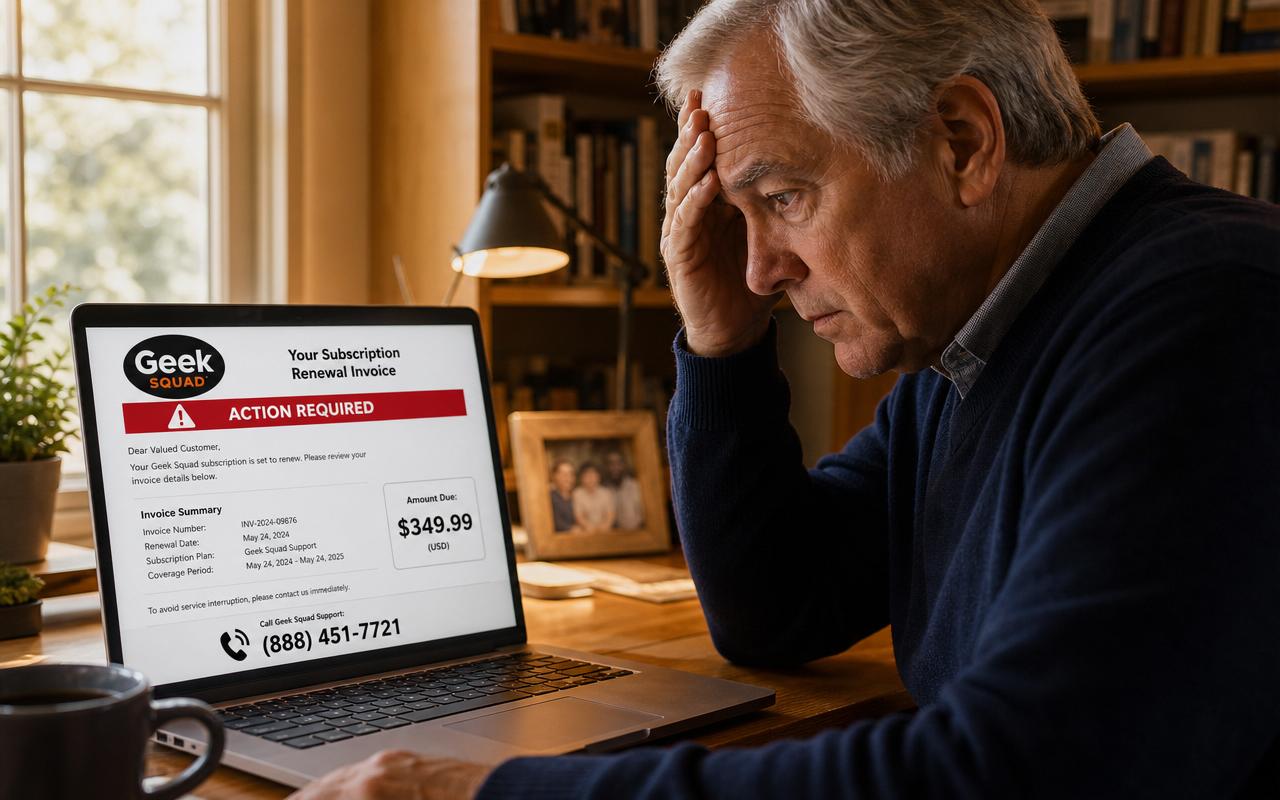
The Geek Squad email scam is the single most-reported phishing email of the last three years. You open your inbox and there's what looks like a professional invoice: the Geek Squad logo, an order number, a plan name (usually 'Geek Squad Total Protection' or 'Geek Squad Antivirus Plus'), a renewal date one or two days from today, and a total between $349.99 and $649.99. At the bottom, in bold red, a message: 'If you did not authorize this renewal, please contact our billing department immediately at 1-8XX-XXX-XXXX. Refund requests received after 24 hours cannot be processed.'
You've never signed up for Geek Squad in your life — or maybe you had it years ago and canceled. Either way, panic sets in. You call the number. A polite man with an Indian accent answers, apologizes for the mistake, and offers to refund you right away. Twenty minutes later you're staring at your online banking, watching in horror as $30,000 appears in your account by 'accident.' He's crying. His boss will fire him. Would you please send back the difference in Apple gift cards, right now, before he loses his job? This is the Geek Squad scam — one of the most profitable retiree cons in America, taking in an estimated $400 million from U.S. seniors in 2024 according to the FBI's IC3 report.
How the Geek Squad email scam works — the full 4-step script
Step 1: The invoice email lands in your inbox
The email is designed to look exactly like a real receipt. It usually includes an official-looking Geek Squad or Best Buy logo copied from the real website, an order or reference number ('GS-87654321'), an itemized 'plan' with a start date and end date, and a total ranging from $349 to $649. The subject line is almost always one of: 'Your Geek Squad subscription is set to renew,' 'Payment Confirmation — Geek Squad,' 'Invoice #87654321,' or 'Auto-renewal notification.' Scammers rotate these lines every few weeks to slip past email spam filters.
Step 2: You call the number to 'cancel' the charge
This is the trap. The email never asks you to click a link — that would let your email provider flag it. Instead it forces you to pick up the phone, which bypasses every automated fraud detection. The number is a U.S. VoIP line (usually starting 1-800, 1-844, 1-855, 1-866, 1-877, or 1-888) that routes straight to a scam call center overseas. The agent is friendly, apologetic, and speaks decent English. They 'look up your account,' confirm you were charged in error, and offer to process a refund immediately.
Step 3: They ask you to install remote-access software
'To send the refund, we need to verify your bank on our secure Geek Squad portal. Please open your web browser and go to anydesk.com [or ultraviewer.net, or teamviewer.com].' Once you install the app, they ask for a 9-digit code that appears on your screen. Handing over that code gives them full remote control of your computer — mouse, keyboard, screen, everything. From that moment on, you are watching a movie of your own computer that they are controlling. They will often black out your screen 'for security' so you can't see what they're doing.
Step 4: The fake 'accidental overpayment'
They ask you to log in to your online banking so they can 'issue the refund.' On screen, you see them type $300. They ask you to look away or cover the screen while they 'submit.' Then they show you your account and — panic — the deposit is $30,000, not $300. They gasp, apologize, cry that they'll be fired, and beg you to send back the $29,700 overpayment in Apple gift cards, Google Play cards, or a wire transfer. Here's the trick: the $30,000 didn't come from Geek Squad. They moved it from your OWN savings or credit line into your checking account. It was never new money. Every dollar you send them is 100% yours, gone forever.
10 red flags that scream 'Geek Squad scam email'
- The sender is not @bestbuy.com or @geeksquad.com. Real Best Buy uses those two domains only. If it's from a Gmail, Outlook, iCloud, or a lookalike like 'geeksquad-billing@help-support.co,' it's fake.
- You're greeted as 'Dear Customer,' 'Dear User,' 'Dear Valued Member,' or with no greeting at all. Real Best Buy emails use your real first name.
- The invoice amount is a suspiciously round or oddly high number: $299.99, $349.99, $399.99, $499.99, $649.99. Real Geek Squad plans are billed monthly ($9.99–$24.99) or annually at published prices.
- There is no working link back to bestbuy.com — just a huge phone number telling you to call within 24 hours.
- The email creates urgency: 'Action required,' 'Non-refundable after 24 hours,' 'Payment will be processed today.' Real Best Buy gives you 30+ days.
- The plan name doesn't match anything you've ever bought (or ever heard of): 'Geek Squad Total Protection Ultra,' 'Geek Squad Antivirus Plus Elite.'
- The email is an image or PDF attachment — the entire 'invoice' is one picture so spam filters can't read the text. Never open PDF attachments from unknown senders.
- There are small spelling or grammar mistakes: 'kindly do the needful,' 'your subscription has been renew,' 'call urgent to cancel.'
- The billing address is missing, wrong, or is a company you don't recognize (some scams use 'Best Buy Co. Inc, Richfield, MN' — which is real — but the sending domain still isn't Best Buy).
- You never signed up for Geek Squad — or you canceled years ago. Real recurring charges do not appear out of nowhere from companies you have no relationship with.
What Best Buy's real Geek Squad emails look like
Legitimate Geek Squad communication has four distinguishing features. First, the sender is always noreply@emails.bestbuy.com, bestbuyinfo@emailinfo.bestbuy.com, or a similar @bestbuy.com subdomain. Second, you're greeted by your real first name. Third, every email links back to bestbuy.com/account where you can see and manage every subscription yourself. Fourth, real billing amounts are small and monthly — Geek Squad Home Membership is $24.99/month, Total Tech Support is $199.99/year, and Best Buy always sends a renewal reminder 30 days in advance, never a same-day 'action required' invoice.
The 24-hour recovery plan if you already called or installed software
If you called the number, gave them remote access, or sent any money, work through this list in order — do not skip ahead. The first six hours matter most.
- Unplug your computer from the internet immediately. Pull the ethernet cable or turn off Wi-Fi. Leave the computer powered on — a real repair technician will want to see it.
- Grab a DIFFERENT device (your phone, a family member's laptop, a tablet). Everything from here on happens on the clean device.
- Change the password on your primary email account first (Gmail, Yahoo, Outlook, AOL, iCloud). Turn on two-factor authentication. Email is the master key — reset it before anything else.
- Log in to your bank on the clean device. Change your online banking password. Review the last 30 days of transactions. Open a fraud claim on anything you did not personally authorize.
- Call your bank's fraud line (the number on the back of your debit card). Tell them you were scammed by remote-access fraud impersonating Geek Squad. Ask them to freeze your accounts, issue new debit cards, and put a fraud alert on the account. If a wire is still pending, ask them to recall it — you have hours, not days.
- Call every credit card company. Freeze the cards, review recent charges, and open fraud claims. Ask for new card numbers.
- Freeze your credit at all three bureaus — free and takes 5 minutes each: Equifax at equifax.com/personal/credit-report-services, Experian at experian.com/freeze, and TransUnion at transunion.com/credit-freeze. This stops the scammer from opening new accounts in your name.
- If you sent gift cards, call the issuer's fraud line immediately: Apple 1-800-275-2273, Google Play 1-855-836-3987, Target 1-800-544-2943, eBay 1-866-961-9253, Best Buy 1-888-237-8289. If the card has not been redeemed yet, they can freeze the balance.
- Take the computer to a real repair shop — actual Best Buy Geek Squad, Staples, or a local pro. Tell them you were remote-controlled by a scammer. Do not just delete the remote-access app; they may have installed a hidden keylogger or backdoor. A full wipe and reinstall of Windows or macOS is the only safe option.
- File reports at reportfraud.ftc.gov and, for losses over $500, at ic3.gov (the FBI Internet Crime Complaint Center). Also forward the original scam email to abuse@bestbuy.com and spam@uce.gov.
- Call one trusted family member the same day. Scammers rely on shame and silence — one follow-up 'we can recover your money for a small fee' call is 5x more likely to succeed if you're keeping the first attempt secret. There is no shame here; these criminals fool retired FBI agents, doctors, and CPAs every day.
The 3 Geek Squad scam email variants going around right now
1. The 'auto-renewal' invoice
The classic. A crisp PDF or HTML invoice showing 'Geek Squad Total Protection' auto-renewing for $349.99 today. If you don't recognize the charge, call the toll-free number. This is 80% of Geek Squad phishing volume.
2. The 'refund confirmation' email
A twist — the email says a refund of $499.99 has just been PROCESSED to your account, and if you didn't request it you should call immediately. This works because now you're calling not to lose money but to 'stop a mystery deposit,' which feels less risky. Same overseas call center, same remote-access script.
3. The 'thank you for your purchase' receipt
Looks like a normal e-commerce order confirmation for a Geek Squad service you never bought, with 'If this was not you, please contact us within 24 hours' at the bottom. Same trap.
How to report a Geek Squad scam email — and stop the next one
- Forward the original email (with full headers) to abuse@bestbuy.com. Best Buy's security team investigates and works with hosting providers to take down scam infrastructure.
- Forward the email to the FTC at reportfraud.ftc.gov (their online form now accepts email attachments directly).
- In Gmail, click the three-dot menu → 'Report phishing.' In Outlook, click the down-arrow next to 'Junk' → 'Phishing.' In Apple Mail, forward to reportphishing@apwg.org. This trains your email provider's filters to catch future variants.
- Delete the email from Trash so you never accidentally reopen it.
- If someone else in your household uses your Wi-Fi, tell them what to look for — scammers often send the same email to everyone at a leaked address.
How to protect yourself from the next Geek Squad scam email
- Never call a phone number from an email invoice. Instead, log in to the company's website yourself (type the URL, do not click).
- Never install remote-access software (AnyDesk, TeamViewer, UltraViewer, LogMeIn, Zoho Assist, Splashtop) for anyone who calls you unsolicited. No real support agent needs it if you already have an account with them.
- Never move money to 'fix' an overpayment refund. Any bank error is fixed by the BANK, not by you sending gift cards or wiring cash.
- Turn on two-factor authentication (2FA) on your email, bank, Amazon, Apple ID, and Google account. Free and takes 3 minutes each. This is the single biggest security upgrade a retiree can make.
- Use a modern email provider (Gmail, Outlook, iCloud) — their spam filters catch 90%+ of Geek Squad emails automatically. Older AOL, Hotmail, and Yahoo accounts get hit harder because the filters are weaker.
- Save a written note next to your computer: 'If a company I did not sign up with sends me a bill, I do not call the number in the email. I hang up. I ask my [son / daughter / friend] to look at it before I do anything.'
The bottom line
The Geek Squad scam email is engineered to trigger panic — a big charge, a short deadline, a friendly voice offering to help. Every step of the script depends on getting you on the phone. The moment you close the email and log in to bestbuy.com yourself, the entire scam collapses. When in doubt, do not call. Do not click. Do not install anything. Show the email to a trusted person, or forward it to Safe Retire Watch and we'll tell you within minutes if it's real.
Paste a suspicious text or email — instant AI verdict.
Paste any URL before you click — free phishing check.
Get scam alerts before they reach you
Safe Retire Watch sends real-time alerts when new scams target retirees in your state. From $9/month. 30-day money-back guarantee.
Get Protected